Installing the Dashboard 8" in SimHub
The Dashboard 8" is set up in a few minutes with SimHub and the AGRacing.fr plugin: it installs the DNR Endurance Wide dashboard, configures the screen and selects it automatically. Follow the 5 steps below.
The software SimHub is required to configure and use the Dashboard 8".
You will also need the AGRacing.fr plugin for SimHub.
Download the AGRacing.fr plugin
Download the AGRacing.fr plugin for SimHub: it adds a tab dedicated to your AG Racing screens and takes care of the whole setup.
Install the plugin in SimHub
Copy the AGRacing.SimHub.Plugin.dll file into the SimHub installation folder, usually C:\Program Files (x86)\SimHub. Open SimHub, go to “Add / Remove features”, enable “AGRacing.fr”, then restart SimHub.
On first start, the plugin installs its DNR Chrono and DNR Endurance dashboards itself: no more profiles to download or import.
Add the Dashboard 8" in one click
Plug the Dashboard 8" in over USB. In SimHub, open the “AGRacing.fr” tab: on the home page, click “Set up” under Dashboard 8", then “Add a Dashboard 8"”. The plugin creates the screen, enables touch and ties it to its USB port: nothing left to do in the “Devices” tab.

The dashboard is already selected
“DNR Endurance Dashboard Wide AGRacing” is selected automatically in “Dashboard shown”. To use another one, just pick it in the list, for example the Lovely Dashboard MXL (see below).
Customise the dashboard (optional)
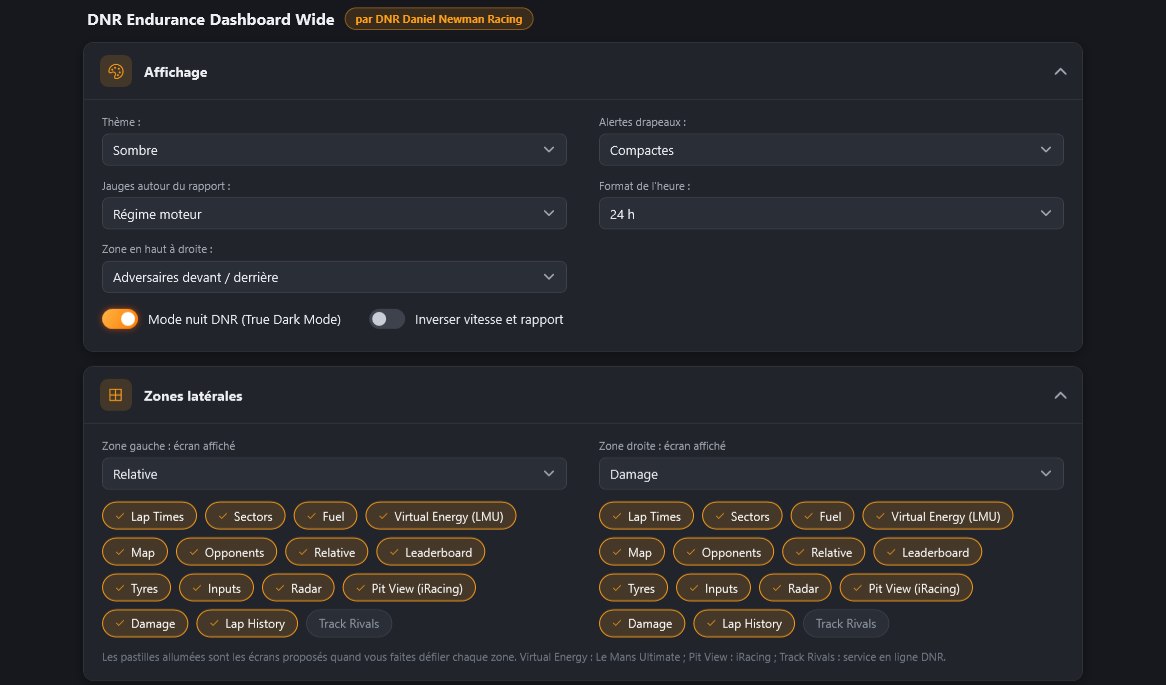
Below the screen list, the DNR Endurance dashboard settings apply live: theme, gauges around the gear (revs, fuel or energy), top zone, flag alerts, side zones and their 15 screens, delta, driving aids (spotter, brake indicator, fuel target) and idle screen (name, number, background and colours).
Prefer the Lovely Dashboard? Download the profile, import it from SimHub's “Dash Studio” tab (“Import dashboard”), then pick “Lovely Dashboard MXL” in the “Dashboard shown” list of the Dashboard 8" tab.
If the plugin says automatic setup is not available with your SimHub version: in the “Devices” tab, add a “Vocore” device, enable touch, then pick “DNR Endurance Dashboard Wide AGRacing” as the main dashboard.
Setup Complete
Your Dashboard 8" is now set up with the DNR Endurance Wide dashboard in SimHub.